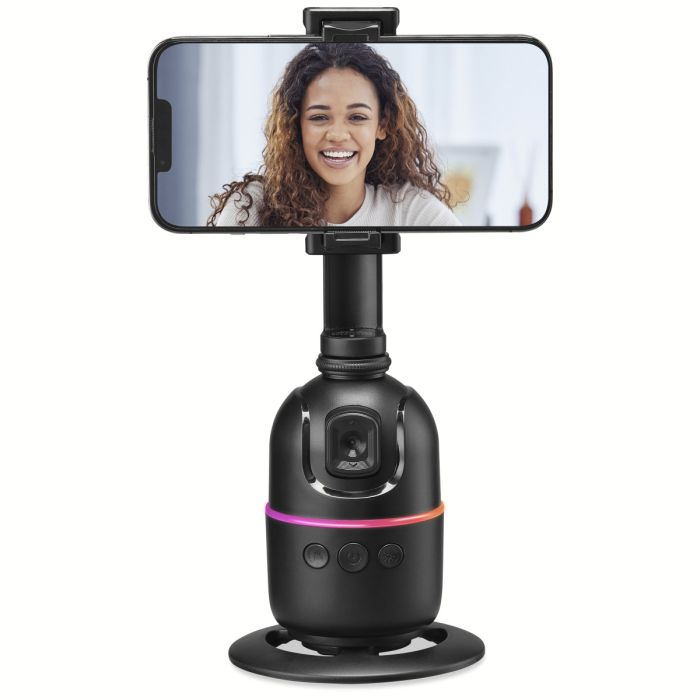
What size phones does the tripod support?
The phone holder fits phones between 2.56 inches and 3.74 inches wide.
Can I use my phone vertically or horizontally?
Yes. The phone holder supports both vertical and horizontal phone mounting.
Does the tripod rotate?
Yes. The gimbal rotation base provides 360-degree face and gesture tracking. You can also manually rotate the tripod using the button controls.
How do I turn the tripod on or off?
Press and hold the Power button for 5 seconds to turn the tripod on or off. When powered on, the LED light will display solid green.
How long does it take to charge?
The guide states that a full charge takes approximately 3 hours.
How do I charge the tripod?
Use the included USB-C to USB cable to connect the tripod to a powered-on computer or a USB power adapter. The USB power adapter is not included.
How do I know when the tripod is charging?
While charging, the charging indicator displays a solid red light. When charging is complete, the indicator turns off.
Does the tripod turn off automatically?
Yes. The tripod automatically turns off after 15 minutes of inactivity.
Does the tripod automatically track me?
Yes. The tripod automatically enters Tracking Mode after powering on. For the best facial recognition and tracking results, adjust the tracking camera lens toward your face.
How do I pause tracking?
Press the Power button while in Tracking Mode to pause tracking. Press it again to resume tracking.
How do I adjust the tracking camera?
The tracking camera lens can be tilted up or down to provide a better view for tracking.
What should I do if facial tracking isn't working well?
Adjust the tracking camera lens so that it is pointed toward your face. The guide specifically recommends doing this for the best facial recognition and tracking results.
How do I turn on Gesture Mode?
Press the Gesture and Tracking button. The LED will slowly flash green three times and then display a solid green light.
How do I turn off Gesture Mode?
Press the Gesture and Tracking button again. The LED will flash three times and then display a solid blue light.
How do I start tracking using gestures?
With Gesture Mode enabled, make an “OK” symbol toward the tracking camera. This starts tracking.
Can I switch tracking from one person to another?
Yes. If multiple people are in the frame, the new person can make the “OK” symbol toward the tracking camera to change the tracking focus to them.
How do I pause tracking with a gesture?
In Gesture Mode, hold up your palm, or make a “Stop” sign, toward the tracking camera to pause tracking.
How far away should I be when using Gesture Mode?
Gesture Mode works best when you are approximately 3–10 feet away. The tracking camera may not recognize gestures if you are too close or too far away.
What does a green light mean?
A solid green light indicates that the tripod is powered on and tracking is active.
What does a red light mean?
A red light indicates that tracking is paused while the tripod is powered on.
What does a flashing green light mean?
Three green flashes followed by a solid green light indicate that Gesture Mode has been turned on.
What does a flashing blue light mean?
Three flashes followed by a solid blue light indicate that Gesture Mode has been turned off.
How do I rotate the tripod to the left?
Press the Gesture and Tracking button twice to rotate the tripod to the left (clockwise). Press it twice again to stop the rotation.
How do I rotate the tripod to the right?
Press the Light button twice to rotate the tripod to the right (counterclockwise). Press it twice again to stop the rotation.
Can I turn the LED lights on or off?
Yes. Press the Light button to turn the LED lights on or off.
What is included in the box?
The guide lists:
- User’s Guide
- USB-C power cable
How do I assemble the tripod?
- Screw the main body of the tripod onto the base and tighten the lock on the bottom.
- Attach the phone holder stand to the main body, making sure the front is aligned with the tracking camera, then tighten the clamp.
- Gently pull the phone-holder flaps outward and insert your phone.
Which direction should the phone holder face?
The front of the phone holder should be aligned with the tracking camera when attaching it to the main body.
Can I use the tripod near water?
No. The user guide instructs users not to use the apparatus near water.
How should I clean the tripod?
Clean it only with a dry cloth.
Can I place the tripod directly on furniture?
The guide warns against placing the unit directly on furniture with soft, porous, or sensitive finishes because the rubber feet may cause marks or staining. A protective barrier, such as a cloth or piece of glass, is recommended.